- 🌐 Web
- 🔗 Api
GitHub Repositories (5)
About the Project
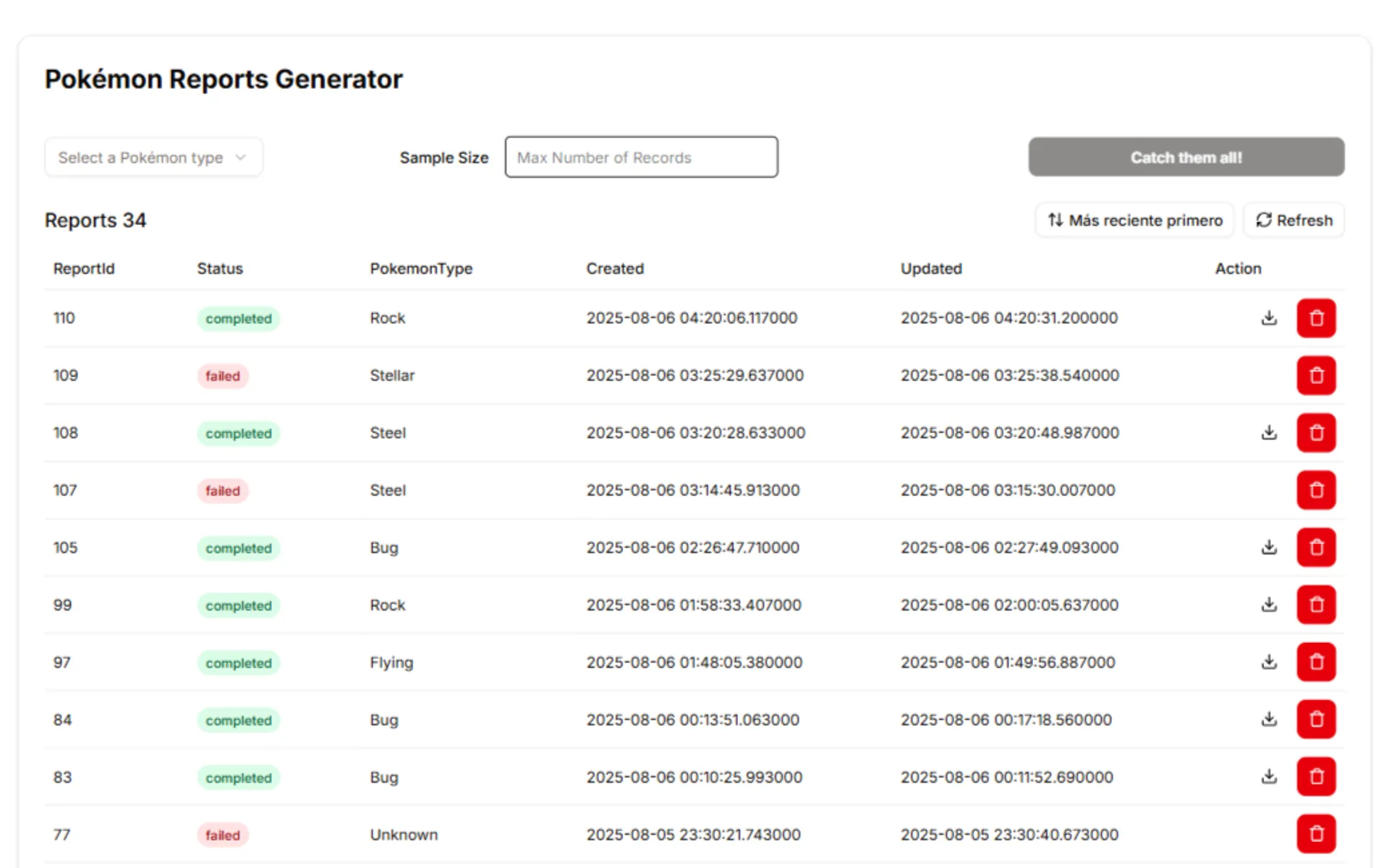
Web application that allows users to request the creation of CSV reports based on data from an external API (PokeAPI).
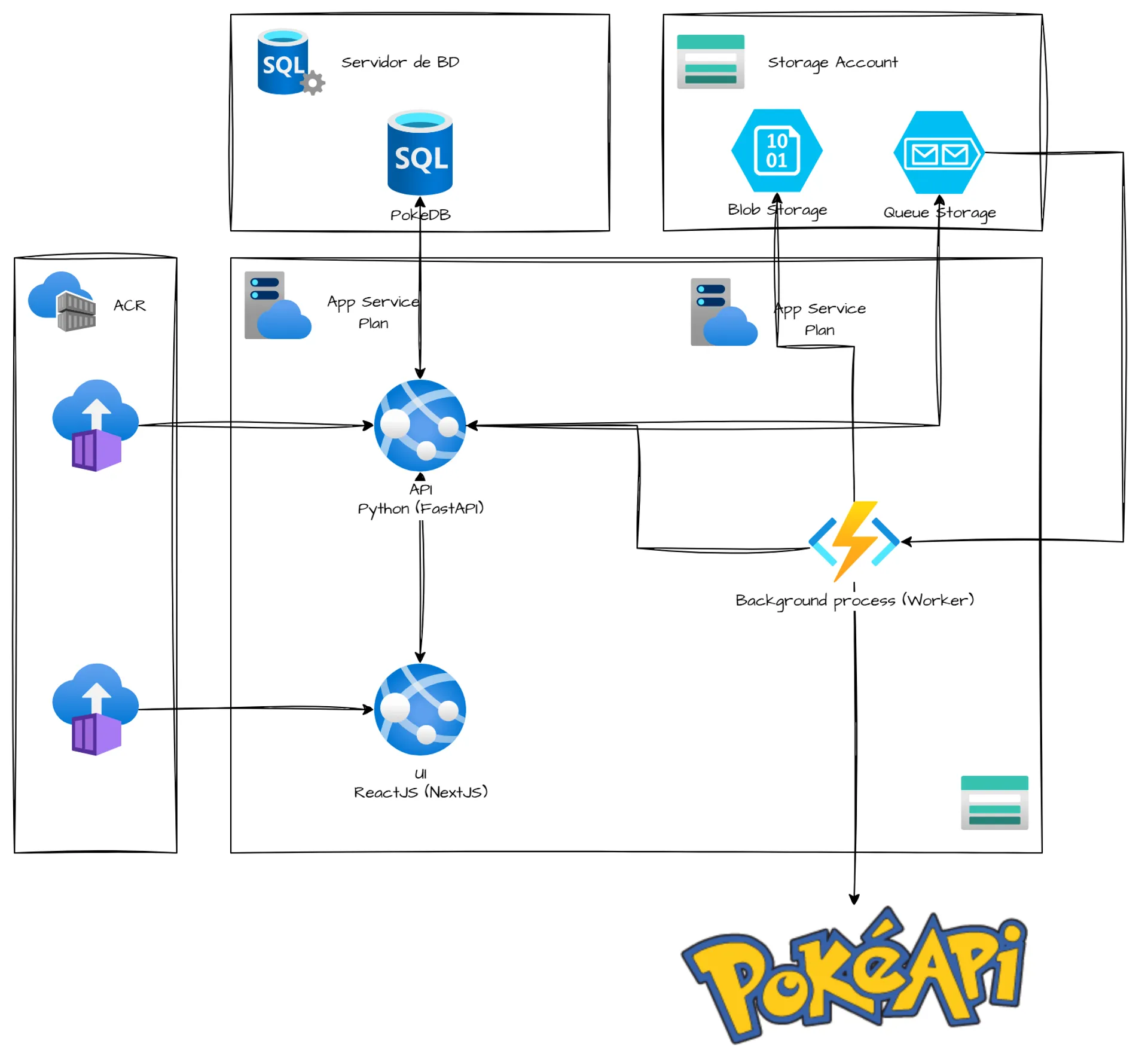
The application features a modern interface, a robust API, a decoupled background process, and uses Azure cloud services, as shown in the reference architecture.
Proposed Architecture
The following diagram represents the architecture used to build the Report Generator system. Microsoft Azure services were used.
1. 🧮 Database
Azure SQL Database was used to store information about the created requests and reports.
2. 🗂️ Storage for generated reports and messages
Azure Blob Storage was used to store the generated CSV reports, and Azure Queue Storage was used to store messages received when generating new reports.
3. ⚙️ Asynchronous Process
Azure Functions (Python Queue Trigger) was used to process the messages in Queue Storage.
4. 🖥️ Frontend
It was built with Next.js and deployed on Azure App Service.
5. 📡 Backend
A Python API with FastAPI was used and deployed on Azure App Service.
6. 🐳 Cloud deployment
To make the application run independently in a real cloud environment, a Dockerfile was created with all necessary dependencies and configurations, and the Docker image was published to Azure Container Registry.
Project Content
🛠️ This project was not only about building from scratch, but also about improving and expanding existing functionality.
Throughout development, several technical challenges were addressed involving the Frontend, Backend, the asynchronous worker in Azure Functions, and the cloud infrastructure.
Each improvement had the main goal of enhancing the user experience, improving system performance, and optimizing the handling of data coming from the PokeAPI.
🗑️ Implement Full Report Deletion
The provided Report Generator system only allowed creating new reports based on the selected Pokémon type, so the first task was to let the user delete reports. To achieve this, the following Frontend and Backend changes were implemented:
1. An “Delete” button was added to each row of the reports table shown in the UI.
2. A modal dialog was implemented that appears when the user clicks the button, asking for confirmation before proceeding.
3. Creation and implementation of a new endpoint that allowed deleting the database record and the corresponding CSV file (report).
4. Handling of potential errors that could occur when deleting both the record and the file.
5. UI/UX improvements, such as updating the table and showing a confirmation message when deletion completed successfully.
📊 Enrich the Report with Pokémon Details
The reports generated by the system only contained two fields: the Pokémon name (name) and the Pokémon URL (url). Therefore, the process needed to be modified to include more information using the existing URL.
For this, the following changes were implemented in the worker (Azure Function), which was responsible for fetching data and generating the CSV files:
1. After obtaining the initial Pokémon list with each one’s name and URL, the worker iterated over each Pokémon using the URL to retrieve additional data such as height, weight, sprite, generation, types, stats (hp, attack, defense, special-attack, special-defense, speed), and abilities.
2. To keep the code cleaner and more organized, two new helper functions were created get_pokemon_info and get_pokemon_generation. The first returned all new fields in a list, which were then added to the existing ones. The second was implemented to obtain the Pokémon’s generation, since this value was not available directly from the initial URL and required a third request.
3. Handling of potential errors that could occur when making the requests.
🎲 Reports with Random Sampling
The provided system was designed to generate reports using all Pokémon that belong to a given category (type), so a new option was requested where the user could enter a quantity (sample_size) representing the total number of records the report would contain. In addition, the returned records had to be random.
For this task, changes were made to the Frontend, Backend, the worker (Azure Function), and the Database:
1. A numeric input field was added to the UI, where the user would enter the number of records to return.
2. In the database, a 'sample_size' INT NULL field was added to the 'request' table. This field stores the number of records requested when provided.
3. On the backend side, the 'sample_size' field was added to the Pydantic model, and the 'insert_pokemon_request' endpoint was modified to receive the new value and send it to the worker.
4. Once 'sample_size' was received by the worker, it generated only the requested number of records ('sample_size') and did so randomly, using the full collection of records as the base.
5. Handling of potential errors that could occur when making the requests.
6. Validation of the user input to ensure it is a positive integer.
7. UI/UX improvements, such as showing messages when the entered value is invalid.
Technologies Used
 Azure App Service Plans
  Azure App Service
  Next.js Azure App Service Plans Azure App Service
  FastAPI
  Azure SQL Server
  Azure SQL Database
  Azure Resource Group
  Terraform
  Azure Container Registry
  Azure Blob Storage
  Docker
  Azure Queue Storage
  Azure Functions