- 🌐 Web
- 🔗 Api
About the Project
Development of a comprehensive backend solution capable of migrating data at scale, exposing it through a secure and optimized API, and deploying everything in a production cloud environment.
In addition, a monitoring system and a caching strategy with automatic invalidation are implemented.
Proposed Architecture
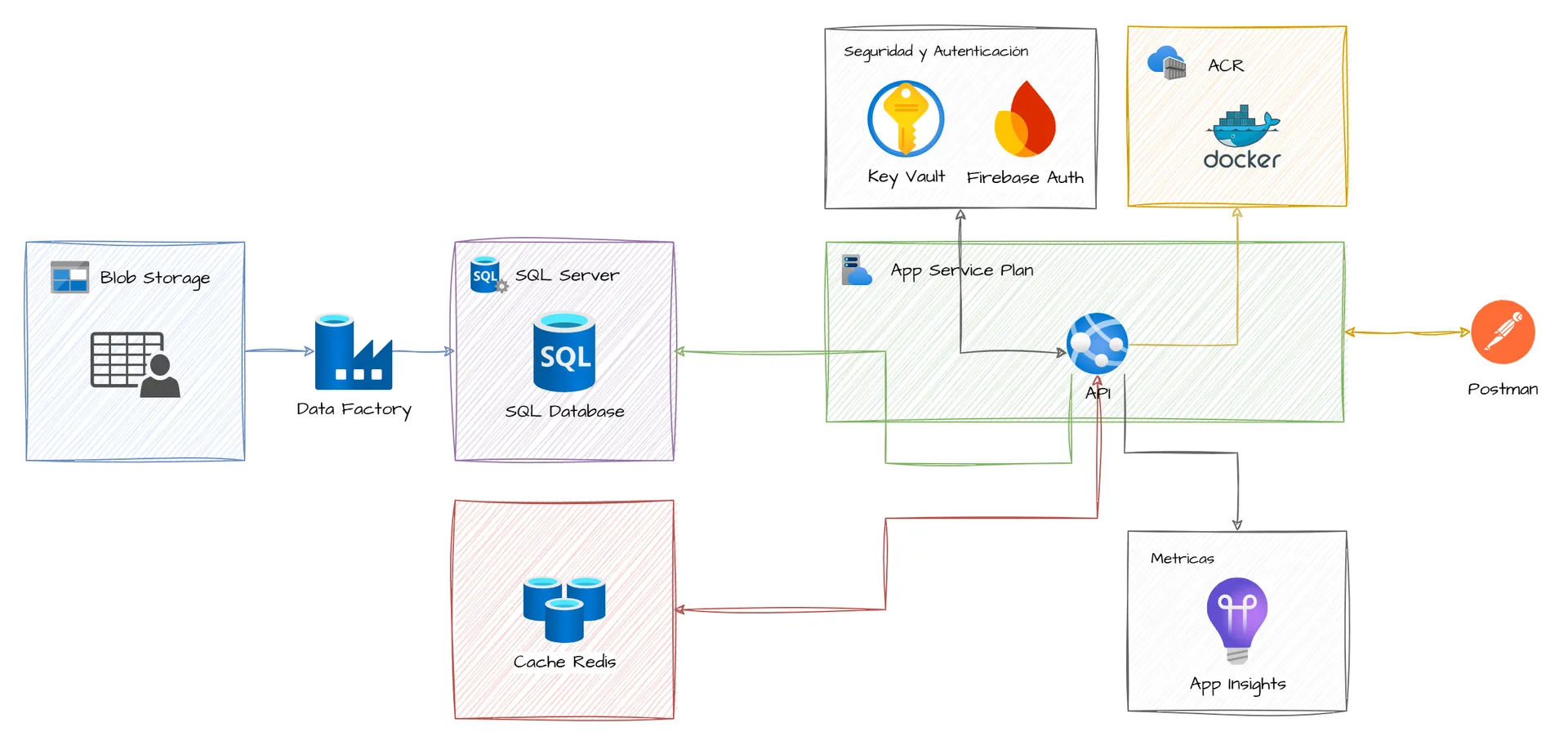
The diagram represents the data flow from data migration to querying it through a secure, optimized API deployed in the cloud, using Microsoft Azure services.
Project Content
To complete this project, different phases had to be carried out.
🏁 Phase 1: Data Preparation and Migration
In this stage, the first step was to find a dataset containing a considerable number of records and then create the database and the corresponding tables in Azure SQL. For our project, an Amazon Products dataset obtained from Kaggle was used.
To migrate the data, Azure Data Factory was used by creating pipelines that extracted the data from the dataset (uploaded to Azure Blob Storage) into each of the tables.
🔑 Phase 2: API Development and Authentication
With the data loaded into the database tables, several APIs were created to interact with them, applying best development and security practices.
The APIs were developed using FastAPI (Python), and certain endpoints required a JWT token. Firebase Authentication was implemented to manage user registration and login via email.
⏲️ Phase 3: Performance Monitoring
Azure Application Insights was used together with the APIs to capture telemetry, request traces, response times, and possible errors.
To do so, multiple consecutive requests were made to the endpoints to analyze and observe the API’s behavior in the Application Insights dashboard.
🧠 Phase 4: Cache Implementation with Redis
To improve response times, a caching layer was implemented by configuring and connecting a Redis cache database.
In this phase, a key had to be generated to store each response in Redis, with two possible scenarios:
1. If the key exists, the response is returned immediately from it.
2. If it does not exist, the database is queried, the response is stored in Redis using the dynamic key, and then the response is returned to the user.
🧹 Phase 5: Cache Invalidation
This phase addressed the problem that when new data is inserted, the original data changes and the cache becomes stale, so the generated cache had to be “smart.”
To do this, a function was created so that whenever a new record was added, it would delete the specific Redis key related to each category.
🚀 Phase 6: Cloud Deployment with Docker
The final phase... The application had to be packaged and deployed to run independently in a real cloud environment.
For this, a Dockerfile was created with all the necessary dependencies and configurations so it could run in isolation, the Docker image was published to Azure Container Registry, and deployment was completed by running the container on Azure App Service.
🔐 Extra Phase: Integrate Key Vault
Azure Key Vault was integrated to securely manage sensitive secrets such as connection strings, service access keys, and credentials. During this phase, the application configuration was modified to retrieve these values directly from Key Vault, increasing security and enabling centralized secret management, especially in continuous deployment environments.
Technologies Used
 Azure App Service Plans
  Azure App Service
  Azure SQL Server
  Azure SQL Database
  Azure Cache for Redis
  Application Insights
  Azure Resource Group
  Terraform
  Azure Data Factory
  Azure Container Registry
  Azure Blob Storage
  Docker
  Firebase Authentication
  Azure Key Vault
 Gallery Projects
Screenshots of the system